WireGuard site-to-site behind a FRITZ!Box
Problem
Two locations, one network:
- backups from the Remote Location to the Proxmox Backup Server at the Main Location
- later a second step: replicate those backups from the Proxmox Backup Server at the Main Location to a second one at the Remote Location, so the off-site copy runs in both directions
- services reachable in both directions, name resolution that works on both ends
- the test case that decides whether it is really one network: a laptop carried from the office to the Remote Location should reach the CIFS filer the way it does at the desk. Same share, same path, no VPN client to start, no drive letter to remap
Infrastructure
The Remote Location sits behind a FRITZ!Box Cable 6690 on a cable connection with a dynamic address.
The Main Location has a business fibre connection with a static address from Händle & Korte in Düsseldorf. The internet firewall runs on a Proxmox VM.
I had a couple of Raspberry Pi 5s with an NVMe SSD (NVMes are more reliable than SD cards) and a proper enclosure lying around (you can only ever have too few Raspis ;-)):
- Argon NEO 5 M.2 NVMe PCIe case (normally the fan is not running, no noise)
- Samsung 990 EVO Plus, 1 TB NVMe M.2 SSD (I had a problem with some smaller no-name NVMes)
FRITZ!OS and site-to-site VPN
FRITZ!OS speaks WireGuard, so the obvious idea was to let the router do it. That is not what the feature is for. WireGuard in FRITZ!OS is meant for client access, not for a site-to-site tunnel.
Analysis
Client VPN is not a site-to-site VPN. WireGuard in FRITZ!OS is built for single devices dialling into the home network: a laptop, a phone, one peer with one address. What a site coupling needs is a peer that carries a whole subnet, routes it, and answers for it. The router does not do that, and bending it into shape would mean fighting the product.
So the tunnel moved one hop inward: a Raspberry Pi 5 on the LAN behind the FRITZ!Box terminates WireGuard and routes the remote network. The FRITZ!Box stays what it is, a modem and a router, and forwards the tunnel.
The subnets have to be different, and that is where most couplings die. Every FRITZ!Box leaves the factory on 192.168.178.0/24, so two of them joined by a tunnel share a network and nothing routes. On a FRITZ!Box the local network is changed in a minute, so fix it before you build the tunnel. At scale the same problem gets expensive: when two companies merge and both run 10.0.0.0/8 with overlapping ranges, you end up with NAT and PAT between the sites. Avoid that if you can. Vodafone bought Kabel Deutschland and both used 10.* IPs.
The Remote Location kept the default, the Main Location runs 192.168.1.0/24, 192.168.253.0/24 and 192.168.254.0/24 for roaming clients, and the tunnel itself sits in 10.254.0.0/30. No overlap anywhere, and the laptop from the office keeps its CIFS share because the server address it knows exists only once in the whole setup. If both ends do collide, renumber one site before you build the tunnel. NAT between the two would paper over it and break every service that carries an address inside the protocol.
Who dials whom follows from the addresses. The Main Location has the static address, so it is the endpoint. The Remote Location has a dynamic one, so it is always the initiator. That also keeps IPv6 out of the picture, which was a deliberate choice here: one address family, one set of rules, fewer things that can behave differently at three in the morning.
One side observation, and it is the reason for the thank-you note at the end. The link worked, but a manual ping only tells you about the second you are looking at. Smokeping runs all day, from the Remote Location to the Main Location, and plots latency and loss over weeks. In that graph a pattern showed up: short spikes with occasional loss, clustered in periods when the link had been idle, and never while the backup was running.
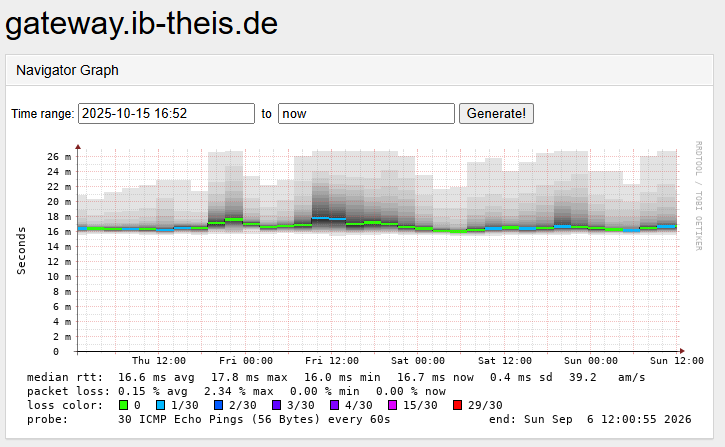
Over that window the probe reported 0.15 percent average loss with peaks of 2.34 percent. Small enough to miss, large enough to drop the first packet of a new SSH session.
MTU turned out to be a non-issue. The tunnel runs at 1420 bytes, the usual value for WireGuard over a 1500 byte path, and nothing had to be clamped or tuned: the devices on both sides discover the path MTU and adapt. Worth stating, because MTU is the first thing everyone blames when a tunnel feels slow. And MTU cannot explain packet loss on small ICMP echo packets anyway.
DNS deserved its own thought. Resolution must not depend on the tunnel being up. The Pi runs Unbound as the resolver for the Remote Location. It forwards to the resolver at the Main Location over the tunnel, so internal names resolve and answers are cached locally. If the Main Location is unreachable, it falls back to resolving from the public DNS on its own. The site keeps working; only the internal names are gone, which is exactly what you want.
Fix
WireGuard
A running link seen from the gateway VM at the Main Location. Keys, the dynamic address and the port numbers are
redacted; the three <port> placeholders are not necessarily the same number:
grethe@gateway:$ sudo wg show
interface: wg0
  public key: <public key of the gateway VM>
  private key: (hidden)
  listening port: <port>

peer: <public key of the Raspberry Pi>
  endpoint: <dynamic address of the remote site>:<port>
  allowed ips: 10.254.0.2/32, 192.168.178.0/24
  latest handshake: 1 minute, 8 seconds ago
  transfer: 1.32 GiB received, 101.97 MiB sent
  persistent keepalive: every 25 seconds
The configuration on the Raspberry Pi, the side that dials:
grethe@vpn-remote:~ $ sudo cat /etc/wireguard/wg0.conf
[Interface]
Address = 10.254.0.2/30
PrivateKey = <private key of the Raspberry Pi>
ListenPort = <port>

[Peer]
PublicKey = <public key of the gateway VM>
Endpoint = 185.6.68.20:<port>
AllowedIPs = 192.168.1.0/24, 192.168.253.0/24, 192.168.254.0/24, 10.254.0.1/32
PersistentKeepalive = 25
And the matching peer on the gateway VM, which has no Endpoint line because it only ever waits:
# Gateway VM at the Main Location: the endpoint
[Peer]
PublicKey  = <public key of the Raspberry Pi>
AllowedIPs = 10.254.0.2/32, 192.168.178.0/24
Three details matter more than the key exchange. AllowedIPs has to list the remote network, not just the
tunnel address, or packets are encrypted but never routed. Both sides need forwarding enabled and a route to the
other subnet, which on the FRITZ!Box side means a static route pointing at the Pi. And the initiator sets
PersistentKeepalive, because an idle UDP flow through a consumer router is a flow that may quietly disappear.
FRITZ!Box settings
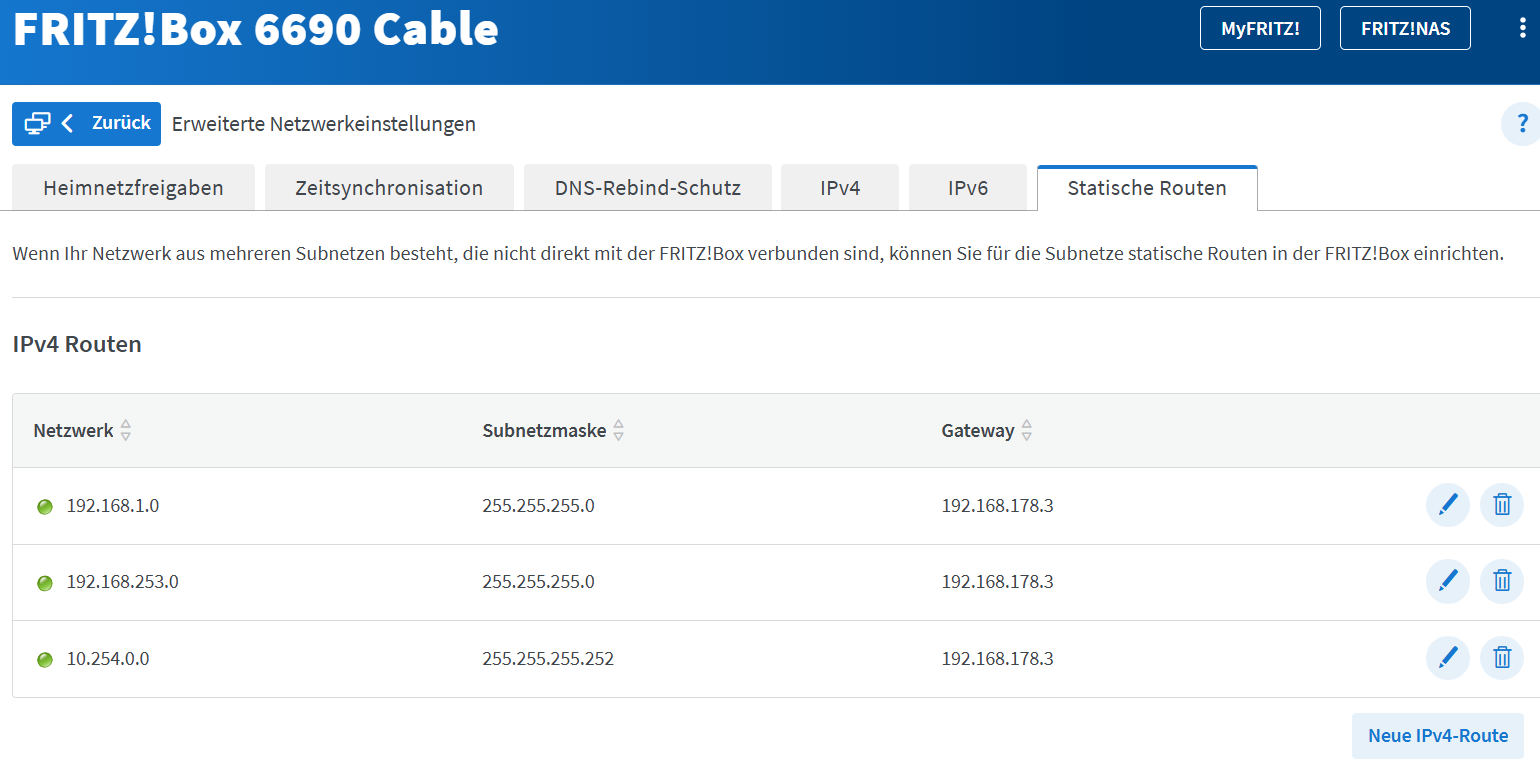
Two settings in the FRITZ!Box do the rest. The static routes send the networks of the Main Location and the tunnel network to the Raspberry Pi, so every device at the Remote Location reaches the other site without knowing about the tunnel:
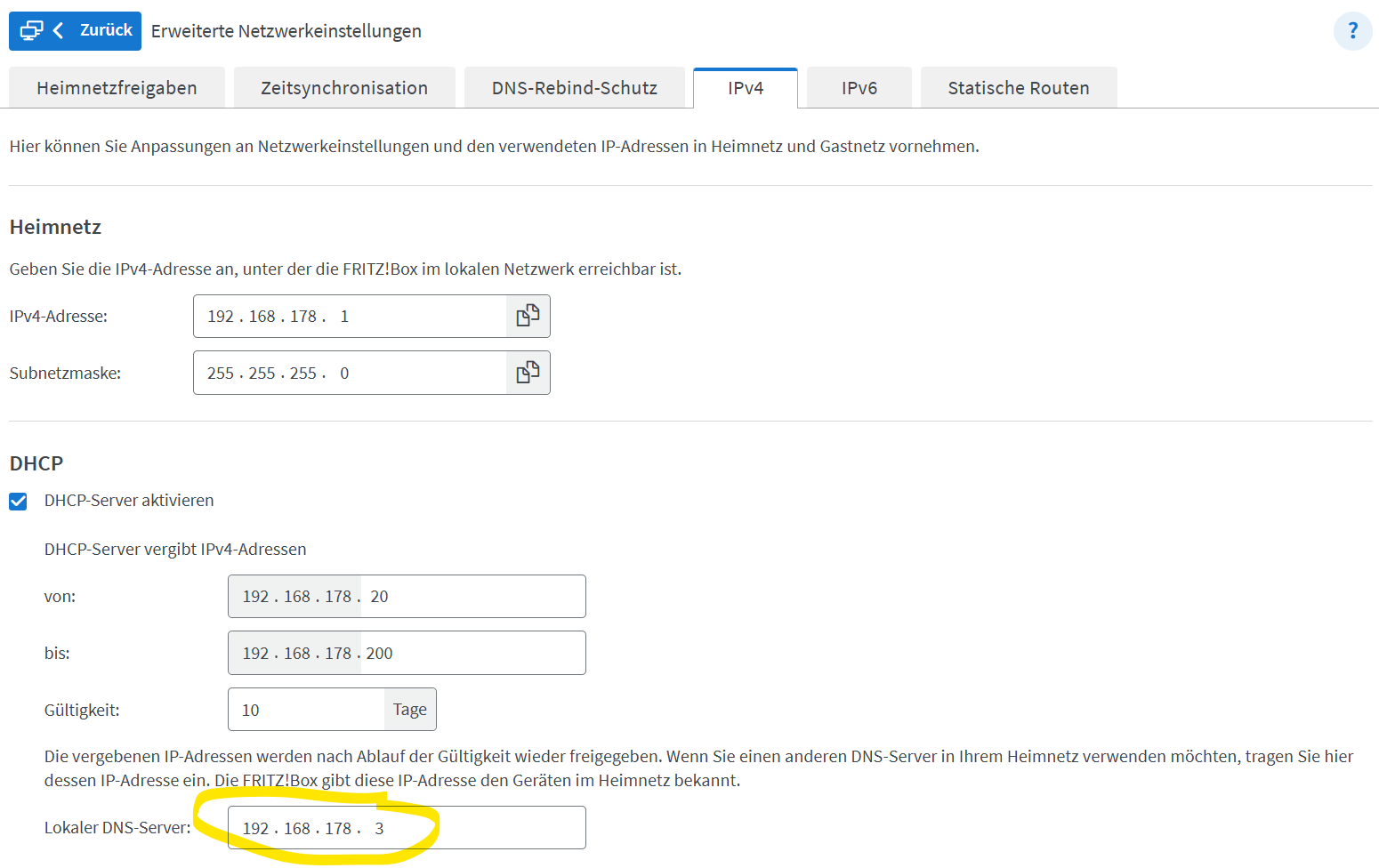
And the DHCP server hands out the Pi as the local DNS server, which is how Unbound ends up in front of every client in the house:
The FRITZ!Box DHCP server hands out fritz.box as the DNS search path. For CIFS shares on a Windows laptop
that means mapping the share with an FQDN. Worst case, edit C:\Windows\system32\drivers\etc\hosts on the
client to work around it; filer addresses do not change that often. In general, FQDNs are your friend.
C:\Users\grethe>net use
Neue Verbindungen werden gespeichert.


Status       Lokal     Remote                    Netzwerk

-------------------------------------------------------------------------------
OK           H:        \\diskserv.ib-theis.de\grethe
                                                Microsoft Windows Network
...
Unbound settings
The Unbound settings took a little while to figure out. The FRITZ!Box initially did not like my request (domain-insecure helped there). This is still kind of a hack but it works.
The goal was a DNS server that resolves ib-theis.de and some reverse zones through the resolver in the Main Location and sends everything else to the FRITZ!Box at the Remote Location, which serves fritz.box and the 192.168.178.0/24 reverse zone.
grethe@vpn-remote:~ $ cat /etc/unbound/unbound.conf.d/vpn-forward.conf
server:
  interface: 0.0.0.0
  port: 53

  access-control: 127.0.0.1 allow
  access-control: 192.168.178.0/24 allow
  access-control: 192.168.1.0/24 allow
  access-control: 192.168.253.0/24 allow

  hide-identity: yes
  hide-version: yes

  cache-min-ttl: 300
  cache-max-ttl: 86400

  local-zone: "168.192.in-addr.arpa." nodefault
  local-zone: "10.in-addr.arpa." nodefault


  domain-insecure: "fritz.box"
  domain-insecure: "box"

  verbosity: 4

# Internal domain via the Main Location
forward-zone:
  name: "ib-theis.de"
  forward-addr: 192.168.1.1

# Reverse DNS via the Main Location

# 192.168.1.0/24
forward-zone:
  name: "1.168.192.in-addr.arpa"
  forward-addr: 192.168.1.1

# 192.168.253.0/24
forward-zone:
  name: "253.168.192.in-addr.arpa"
  forward-addr: 192.168.1.1

# 192.168.254.0/24 (the roaming clients)
forward-zone:
  name: "254.168.192.in-addr.arpa"
  forward-addr: 192.168.1.1

# The site-to-site tunnel network
forward-zone:
  name: "0.254.10.in-addr.arpa"
  forward-addr: 192.168.1.1

# Everything else: the FRITZ!Box at the Remote Location (fast local DNS)
forward-zone:
  name: "."
  forward-addr: 192.168.178.1
The verbosity: 4 is on purpose: this part is still under observation and the log is where the answers
are. Turn it down to 1 once the setup has settled, otherwise the resolver writes more than anyone reads.
FRITZ!OS 8.25 and no more packet loss
Then came FRITZ!OS 8.25, and the stalls stopped. The Smokeping graph is flat where it used to spike and drop packets. Honesty requires saying what this is and is not: the symptom is gone, and I did not chase the cause further. Something in the path handles idle connections better than before. The release notes from AVM mention network improvements without going into detail, and the fix may well sit in the closed part of the firmware. I did not dig any deeper.
Thank you, AVM.
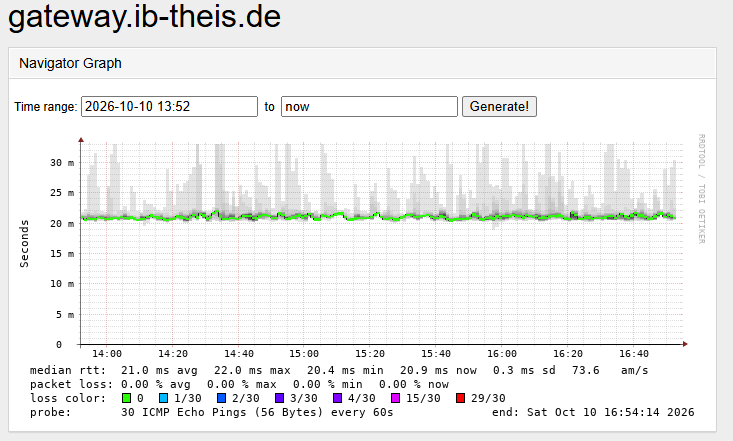
Loss is 0.00 percent for average, maximum and current. The baseline latency differs between the two windows, 16.6 ms over weeks against 21.0 ms over an afternoon, so do not read a speed-up into the numbers. What changed is the loss column.
Still on the list
Two gaps are open, both of the kind that only hurt when nobody is on site:
- A UPS at the Remote Location for the FRITZ!Box and the Raspberry Pi. A short power cut currently takes out the tunnel, the local resolver and the routing in one go, and nothing comes back before the cable modem has synced again.
- A way to power cycle both devices remotely, planned as Zigbee mains actuators driven by Home Assistant. A hung FRITZ!Box or an unresponsive Pi should not need someone to drive to the house and pull a plug.
Takeaway
Measure continuously, or you will not know. The backup to the Proxmox Backup Server ran fine the whole time, and daily work gave no reason to look; only a graph that had been running for weeks showed the weakness. And treat the consumer router in the path as part of the system: it is not just a modem, its firmware belongs in the maintenance window like everything else. Running something similar? Contact us.