You are not random enough
Problem
At a customer site, we run patch management for the RHEL systems from Ansible playbooks. We air-gap the machines, point the YUM repos at our internal RPM repository (JFrog Artifactory), patch the machines and generate patch reports, with some Checkmk downtime handling at the beginning and the end. We patch in phases, database machines first, so that we get a sensible reboot order.
We were seeing strange runtimes for some of our patch phases:
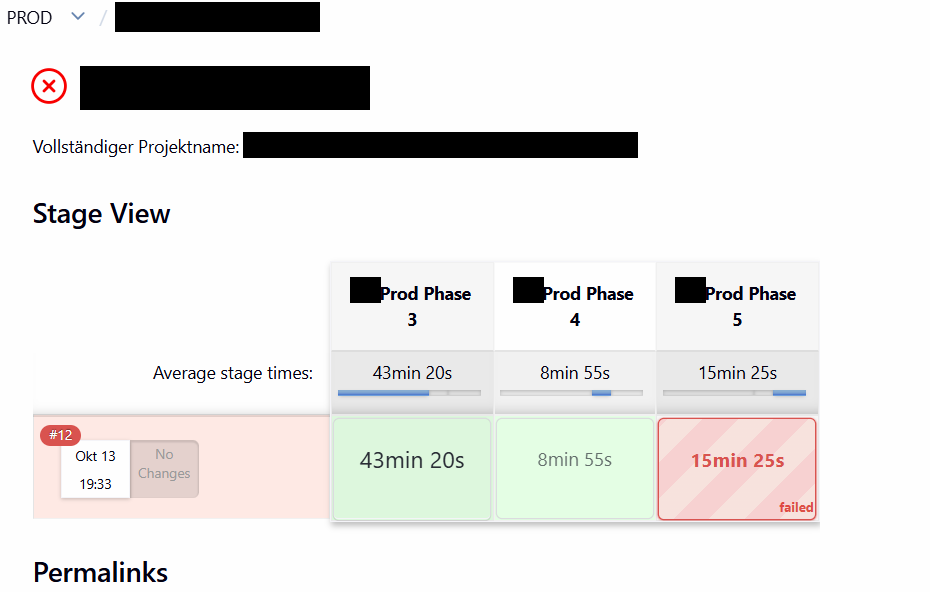
The playbooks were running slowly in some patch phases and on some machines. At first we suspected a networking problem.
Analysis
What follows is a short summary of the analysis. We had had this problem for months and expected it to be related to a networking issue we are seeing (another article, maybe later). The analysis took the two of us, my friend Dariusz and me, 2.5 hours. It was fun in the end, less so in the middle.
At some point we identified a patch phase that only had a few machines.
We ran the air-gapping job from AWX, and the first run in the morning was perfectly fine. That was confusing.
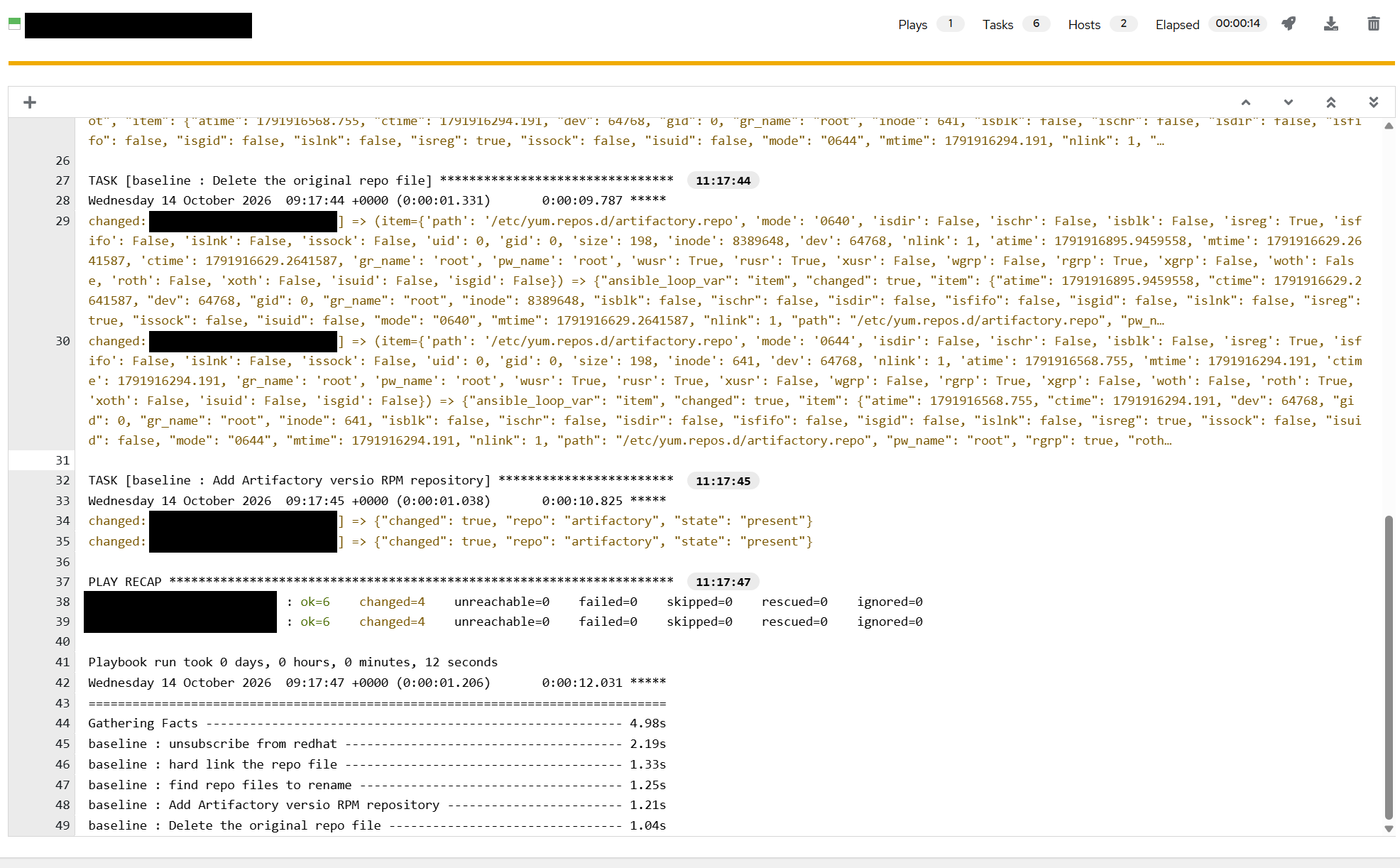
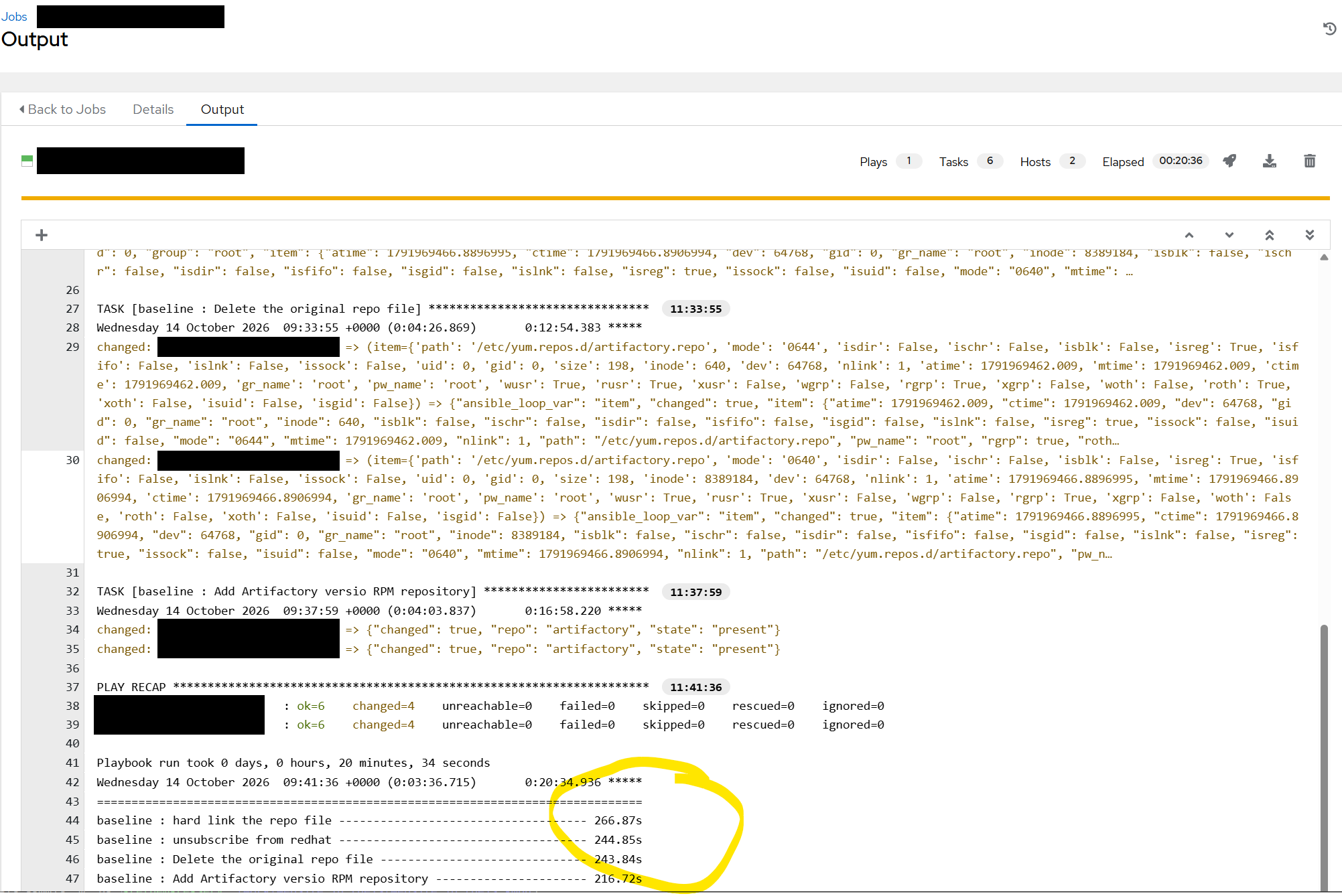
For fun we ran the same job again, and the timings were bad. That was confusing as well.
We then ran the tasks from the Ansible development machine on the command line, to rule out AWX as the cause.
We learned quite a bit:
- Ansible builds a Python module that is copied to the remote machine and executed there
- In our setup, SFTP is used to transfer it (this is configurable; we tried SCP as well)
- sshd does not handle SFTP (or SCP, for that matter) itself; it forks a separate program
- That scp or sftp process was the one hanging
- We were able to reproduce the problem without Ansible with a simple scp
- On the problematic machine multiple scp / sftp-server processes were hanging
Eventually we traced “our” scp process on the server and found it hanging in getrandom().
[root@xxxxx /etc/ssh]# ps -ef | grep scp
root      300309       1  0 12:56 ?        00:00:00 scp -f /etc/ssh/sshd_config
root      301205  284296  0 12:59 ?        00:00:00 scp -t /root/.ansible/tmp/ansible-tmp-1791975556.5008848-751264-111097114614797/AnsiballZ_setup.py
root      301557       1  0 13:00 ?        00:00:00 scp -v -f /etc/ssh/sshd_config
root      303385       1  0 13:05 ?        00:00:00 scp -v -f /etc/ssh/sshd_config
root      305692  305691  0 13:13 ?        00:00:00 scp -f /etc/ssh/sshd_config
root      306008  295457  0 13:14 pts/1    00:00:00 grep --color=auto scp
[root@xxxxx /etc/ssh]# strace -p 303385
strace: Process 303385 attached
getrandom(^Cstrace: Process 303385 detached
 <detached ...>
After a bit of reading, we found that the kernel did not have enough entropy:
[root@xxxxx /etc/ssh]# cat /proc/sys/kernel/random/entropy_avail
37
getrandom() does not return as long as there is not enough entropy. We run VMs on Nutanix, and that setup does not seem to produce
enough entropy fast enough. So the server side of our copy was simply waiting.
Why does this hit SFTP and not an interactive login? The sshd listener is seeded once at boot, and the child process per connection inherits that state. A fresh scp or sftp-server is a newly executed program: it initialises its crypto library from scratch and asks the kernel for random bytes before it does anything else. That call does come back — it just takes until the kernel has collected enough entropy, which on these VMs was around 200 seconds. That is where the 266, 244, 243 and 216 seconds of the AWX tasks above come from, and a patch phase with a handful of hosts adds up to 43 minutes.
We had the problem on RHEL 8 only, up to and including kernel 4.18.0-553.171.1.el8_10.x86_64.
In the end we found that out of about 80 VMs running on the Nutanix clusters in HQ, 6 were not running rngd.
Where rngd is running, there is always enough entropy:
[root@xxxxx ~]# cat /proc/sys/kernel/random/entropy_avail
4036
[root@xxxxx ~]#
Fix
Install rng-tools and start the rngd service. We are running on newer hardware with a hardware random number generator in the CPUs, and rngd feeds that data into the kernel pool. This seems to be the default on RHEL 9 and 10.
Running a small playbook against our servers solved the problem:
- name: Provide entropy via rngd on RHEL 8
  hosts: all
  # become: true
  remote_user: root

  tasks:
    - name: Skip hosts that are not RHEL 8
      meta: end_host
      when: not (ansible_facts['distribution'] == 'RedHat'
                 and ansible_facts['distribution_major_version'] == '8')

    - name: Refuse FIPS-mode hosts
      fail:
        msg: "{{ inventory_hostname }} is in FIPS mode; rngd will not start there. Attach a virtio-rng device instead."
      when: ansible_facts['fips'] | bool

    - name: Install rng-tools
      dnf:
        name: rng-tools
        state: present

    - name: Enable and start rngd
      systemd:
        name: rngd
        enabled: true
        state: started

    - name: Read available entropy
      ansible.builtin.slurp:
        src: /proc/sys/kernel/random/entropy_avail
      register: entropy

    - name: Report available entropy
      ansible.builtin.debug:
        msg: "entropy_avail on {{ inventory_hostname }}: {{ entropy.content | b64decode | trim }} bits"
Takeaway
We had this problem only for RHEL 8 machines. RHEL 9 and 10 did not show this with the much newer kernels.
We still do not know why the problem showed up on one HQ Nutanix cluster only and not on our two local ones (dev/test and prod, with different CPUs and different Nutanix versions). We do not run rngd on those two, and we see no entropy problems there either.
I think it is time for the RHEL 8 upgrade project in 2027.
Once again, a deeper knowledge of sshd and Ansible would have made the debugging smoother.
And the old-fashioned tools like strace and lsof still work and still carry an analysis.
For an afternoon it was quite fun to tell my colleagues that they were “not random enough” :-). That sparked several discussions.